PDF files are widely used for contracts, applications, invoices, forms, and other business documents. When a document needs approval or a signature, printing it, signing it by hand, scanning it, and sending it back can create unnecessary delays. A digital workflow can make the process much simpler. For users working in Microsoft Edge, understanding how to handle PDF signatures is especially useful because Edge includes built-in tools for viewing and working with PDF documents. For more advanced signing workflows, a dedicated eSignature platform such as signNow can help users sign PDF files digitally while keeping the process organized.
Why Digital Signatures Matter for PDF Documents
Electronic documents have become a normal part of business operations. Employees may need to approve HR forms, customers may need to sign agreements, and suppliers may need to complete contracts without exchanging physical paperwork.
A digital signature workflow allows these documents to move between people electronically. Instead of printing a PDF and physically signing it, users can complete the required fields and sign electronically. This can be particularly useful for distributed teams where employees, customers, and business partners may be working from different locations.
For organizations handling a large number of documents, the benefits go beyond convenience. A structured eSignature process can help reduce manual document handling and make it easier to track completed paperwork.
What Can You Do With PDFs in Microsoft Edge?
Microsoft Edge is commonly used to open and read PDF files. Its built-in PDF capabilities make it convenient for reviewing documents directly in the browser rather than opening a separate application.
However, viewing or annotating a PDF is different from managing a complete electronic signature workflow. Businesses often need additional capabilities, such as sending a document to another person for signature, collecting completed documents, and maintaining an audit trail.
This distinction is important when choosing a signing method. Someone who only needs to add a simple annotation may not require an eSignature platform. A business that regularly sends contracts or forms to customers may need a more complete solution.


Using an eSignature Platform for PDF Signing
When a PDF needs to be signed by another person, an eSignature platform can provide a more structured workflow than simply editing the document locally.
With signNow, users can work with electronic documents and send them for signature. The process is designed around common business situations where one or more people need to complete a document electronically.
For example, an HR department could prepare an onboarding document and send it to a new employee. A real estate professional could use a similar workflow for agreements and related paperwork. In healthcare, electronic documents can be handled within workflows that require appropriate compliance controls.
The important point is that the PDF becomes part of a broader document workflow rather than simply being edited on an individual computer.
How to Sign a PDF Electronically
The exact workflow can vary depending on the document and the people involved, but a typical eSignature process follows several practical steps.
1. Prepare the PDF
Start with the final version of the document. Before sending it for signature, review the text and make sure the required information and signature fields are clear.
2. Upload the Document
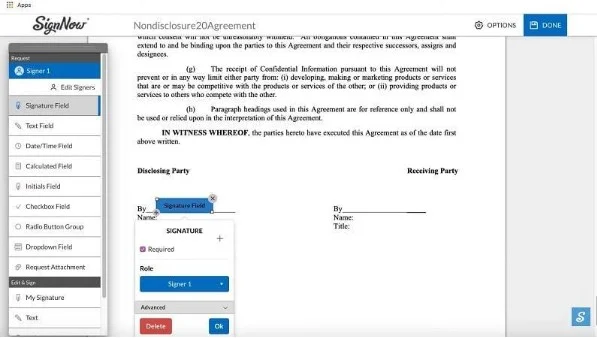
The PDF can then be added to the electronic document workflow. The required fields can be identified so the signer knows where information needs to be entered.
3. Add Signature Fields
Signature fields can be positioned where the recipient needs to sign. Depending on the document, other fields may also be necessary, such as dates or information that the signer needs to provide.
4. Send for Signature
Once the document is prepared, it can be sent to the intended recipient for electronic completion. This eliminates the need to print, scan, and manually return the document.
5. Complete and Track the Document
After the signer completes the required fields, the document can move through the relevant workflow. Audit trails can provide a record of document activity, which is useful for organizations that need visibility into their signing processes.
Digital Signatures for Business Documents
Different industries use PDF documents in different ways, but the underlying need is often similar: documents need to be completed accurately and returned without unnecessary delays.
In real estate, agents and businesses may handle agreements and other transaction documents electronically. Sending documents for signature can reduce the need for physical paperwork when multiple parties are involved.
In healthcare, electronic documents may contain sensitive information and therefore require appropriate controls. signNow supports compliance requirements including HIPAA when a Business Associate Agreement (BAA) is required.
In finance, electronic signatures can be useful for agreements, applications, and internal documentation. Businesses can also benefit from audit trails and security controls when managing sensitive documents.
For legal teams, contracts and agreements can be prepared and sent electronically, helping reduce the administrative work associated with physical signatures.
In HR, onboarding documents are another practical use case. New employees can complete required paperwork electronically rather than receiving printed forms.
Security and Compliance Considerations
A digital signature solution should be evaluated not only for convenience but also for security and compliance.
According to the provided signNow information, the platform uses TLS 1.2/1.3 for data in transit and AES-256 for data at rest. It also provides audit trails and two-factor authentication.
For organizations operating under specific regulatory requirements, signNow supports ESIGN, UETA, HIPAA when a BAA is required, SOC 2 Type II, GDPR, 21 CFR Part 11, PCI DSS, ISO 27001, CCPA, and eIDAS.
These standards and controls can be important when electronic documents contain confidential business information, personal data, healthcare information, or financial details. The appropriate compliance requirements will depend on the organization, document type, and applicable regulations.
Why Audit Trails Are Important
A signature is only one part of an electronic document workflow. Businesses may also need to understand what happened to a document during the signing process.
An audit trail can provide useful information about document activity. This is particularly relevant when a business needs a record of the signing process for internal documentation or compliance purposes.
For example, imagine an HR department sending an employment document to a new employee. If questions later arise about the document, having an electronic record of the workflow can be more useful than relying on an email thread and a scanned copy.
The same principle applies to contracts, agreements, healthcare documents, and other paperwork where accountability matters.
Managing PDF Signatures Across Teams
The value of digital signatures becomes more noticeable when several people are involved in a document process.
Consider a company that needs a manager, employee, and HR representative to complete different parts of an onboarding document. A paper-based workflow may require the document to move physically between people. An electronic workflow can organize those steps digitally.
This can also help remote teams. Employees and business partners do not necessarily need to be in the same office—or even the same location—to complete a document.
The provided signNow information states that the platform has 28 million users and 352 Fortune 500 companies among its customers, including Apple, Walmart, FedEx, Tesla, and Xerox.
Cost and Scalability
Pricing is another consideration when selecting an eSignature platform. According to the provided information, signNow’s Business plan starts at $8 per user per month when billed annually.
The platform also provides unlimited users on all paid plans and does not impose an envelope cap. This can matter for organizations that regularly send documents for signature and want predictable workflows as their usage increases.
For a small business, the important question may simply be whether electronic signing saves enough administrative time to justify the cost. For larger organizations, scalability and document volume can become more important factors.
The provided signNow information also reports an average 700% first-year ROI and savings of up to six hours per week per employee. These figures should be considered in the context of an organization’s own workflow and usage.
FAQ
Can I sign a PDF in Microsoft Edge?
Microsoft Edge can open and work with PDF documents, but viewing and basic PDF editing are different from using a dedicated eSignature workflow. If another person needs to sign the document, an eSignature platform can provide a more structured way to prepare the document and send it for signature.
Is an electronic signature legally valid in the United States?
Electronic signatures are recognized under U.S. laws including the ESIGN Act and UETA. However, legal requirements can vary depending on the document, transaction, and jurisdiction. Businesses should evaluate the specific requirements that apply to their documents rather than assuming every electronic signing situation has identical legal requirements.
Can I send a PDF to someone for electronic signature?
Yes. A dedicated eSignature workflow can allow a PDF to be prepared with the required fields and then sent to another person for signature. This approach is useful for contracts, HR paperwork, business agreements, and other documents where another party needs to complete and sign the PDF.
Are digital signatures secure?
Security depends on the service and implementation. The provided signNow information states that it uses TLS 1.2/1.3 for data in transit, AES-256 for data at rest, audit trails, and two-factor authentication. Organizations should also consider their own access controls and applicable compliance requirements.
What industries can use PDF eSignatures?
PDF eSignatures can be useful across many industries, including real estate, healthcare, finance, legal services, and human resources. Common examples include agreements, onboarding paperwork, applications, contracts, and other documents that require one or more people to review and sign electronically.
Final Thoughts
For people who regularly work with PDF documents in Microsoft Edge, the difference between simply editing a PDF and managing an electronic signature workflow is important. Basic PDF tools may be enough for individual document handling, while businesses often need a more organized process for sending, completing, tracking, and storing signed documents.
An eSignature platform such as signNow can extend the process beyond simply adding a signature. With electronic document workflows, audit trails, security controls, and support for multiple compliance requirements, organizations can handle PDF signing as part of their broader digital business processes.