PDF files are widely used for contracts, forms, applications, approvals, and other business documents. When a document needs to be signed, opening a separate workflow can add unnecessary steps. For users who regularly work with PDFs in Microsoft Edge, knowing how to handle a signature request can make document workflows more straightforward. If you need a practical guide for a digital signature for pdf files edge, the right approach depends on whether you simply need to fill and sign a document or need a more structured eSignature workflow for sending documents to other people.
Understanding Digital Signatures for PDF Files in Edge
Microsoft Edge includes a built-in PDF reader that makes it possible to open and work with PDF documents directly in the browser. This is convenient when someone sends a form or document that needs attention because there is no need to download a dedicated PDF-reading application just to view the file.
However, viewing a PDF and completing a formal electronic signature workflow are not necessarily the same thing. A person may only need to add information to a document, while a business may need to send a document to another party, collect a signature, and maintain a record of the transaction.
For straightforward document work, it is useful to first determine what the PDF actually requires. If the document only needs a signature from one person, a simple fill-and-sign process may be sufficient. If multiple people need to review and sign it, a dedicated eSignature workflow can provide a more organized process.
When an Edge PDF Workflow Is Enough
Not every PDF requires a complicated signing process. Consider a simple form that you have received by email and need to return after completing. If the document can be filled and signed directly in your existing workflow, using the tools already available to you can be convenient.
The important distinction is between adding a visible signature and managing a complete electronic document process. Businesses often need more than a signature placed on a page. They may need to prepare a document, send it for signature, track completion, and retain an audit trail.
This distinction becomes especially relevant when documents move between departments, customers, vendors, or other organizations. A process that works for one occasional PDF may become inefficient when employees are handling documents every day.
For that reason, before choosing a signing method, consider how frequently documents are signed, how many people participate, and whether the organization needs a repeatable workflow rather than a one-time edit.
How a Dedicated eSignature Workflow Can Help
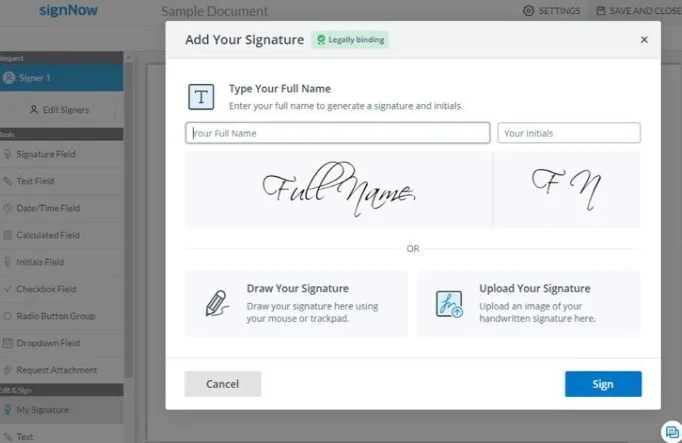
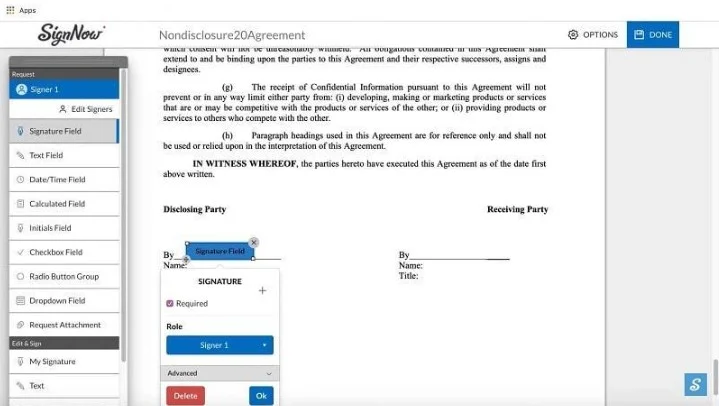
A dedicated eSignature service can provide a more structured approach when a document needs to move through several stages. Instead of treating a PDF as a standalone file, the document becomes part of a workflow where recipients can be asked to complete specific actions.
signNow supports eSignature and electronic document workflows and reports 28 million users, including 352 Fortune 500 companies. Its listed clients include Apple, Walmart, FedEx, Tesla, and Xerox.
For organizations that regularly process documents, this type of workflow can be useful because employees do not have to rely on separate manual processes every time a document needs to be signed. A document can be prepared and sent for signature as part of an established process.

A Practical Example: Sending a PDF for Signature
Consider a human resources department preparing an onboarding document. The employee needs to review information, complete required fields, and sign the document. Instead of treating the PDF as an isolated file, the company can organize the process around sending the document for signature.
The same principle can apply in real estate. An agent may work with agreements that require signatures from several parties. A structured eSignature workflow can make it easier to define who needs to complete the document and when.
Healthcare organizations can also encounter documents that require signatures. In this environment, compliance considerations become particularly important. signNow lists HIPAA compliance when a Business Associate Agreement (BAA) is required, along with several other compliance standards.
Financial and legal teams similarly deal with documents where accuracy, security, and an accessible record of activity matter. The exact workflow will depend on the organization’s processes and legal requirements, but the general principle remains the same: the signing method should match the complexity of the document process.
Security and Compliance Considerations
Electronic documents can contain sensitive business and personal information, so security should be considered alongside convenience. According to the provided signNow specifications, the service uses TLS 1.2/1.3 for data in transit and AES-256 for data at rest.
It also provides audit trails and two-factor authentication (2FA). These features are relevant when organizations need greater visibility into document activity and stronger controls around account access.
signNow lists support for ESIGN, UETA, HIPAA when a BAA is required, SOC 2 Type II, GDPR, 21 CFR Part 11, PCI DSS, ISO 27001, CCPA, and eIDAS.
Compliance requirements can differ according to the organization, industry, document, and jurisdiction. A listed compliance standard should therefore not be treated as a substitute for legal advice. Instead, businesses should evaluate which requirements apply to their specific document workflow.
Choosing Between Filling a PDF and Using eSign
The best option depends on what you need to accomplish.
If you are working with an occasional document that only requires your own signature, a basic PDF workflow may be enough. The process can remain relatively simple when there are no additional recipients or workflow requirements.
For recurring business documents, however, a dedicated eSign process can make more sense. This is particularly true when documents need to be sent for signature, completed by multiple people, or handled as part of a repeatable business process.
The distinction is not about making every signature process more complicated. Instead, it is about using the appropriate workflow for the job. A one-page document requiring one person’s signature does not necessarily need the same process as a contract involving several parties and multiple approval steps.
Businesses should also consider how much time employees spend preparing and following up on documents. signNow reports an average 700% first-year ROI and savings of up to six hours per week per employee, along with an 80% document completion rate.
Pricing and Document Volume
Cost can become an important factor when an organization processes a large number of documents. According to the provided pricing information, signNow Business starts at $8 per user per month when billed annually.
The provided information also states that all paid plans have unlimited users and that there is no envelope cap. This can be relevant for teams that regularly send documents for signature and want to avoid a workflow based around a fixed number of envelopes per user.
Pricing should always be evaluated in relation to the organization’s actual requirements. A business processing only a small number of documents may have different needs from a company where HR, sales, finance, and legal teams are all sending documents for signature.
The practical question is therefore not simply how much the service costs. It is whether the workflow provides enough value to justify the expense and whether it reduces repetitive document-related work.
Common Use Cases for PDF eSignatures
Electronic signatures can fit into many everyday business processes. In real estate, documents may need signatures from buyers, sellers, agents, or other parties. In HR, onboarding documents can require employees to complete and sign forms before joining an organization.
Healthcare teams may need workflows for documents where compliance requirements are relevant. Finance departments can use electronic document workflows for recurring business paperwork, while legal teams can benefit from structured processes for agreements and other documents.
The key is to keep the document workflow aligned with the actual task. A signing process should make it clear who needs to complete the document and what happens after the signature is submitted.
For organizations that process documents frequently, standardizing these steps can reduce unnecessary manual handling and make the overall process easier for employees to follow.
FAQ: Digital Signatures and PDF Files in Edge
Can I sign a PDF in Microsoft Edge?
Microsoft Edge provides a built-in PDF reader for opening PDF documents in the browser. Whether its available PDF tools are sufficient depends on the type of signature and workflow you need. For simple documents, a basic PDF process may be enough, while business workflows may require a dedicated eSignature solution.
What is the difference between an eSignature and filling a PDF?
Filling a PDF generally means entering information or completing fields in the document. An eSignature workflow is broader because it can involve preparing a document, sending it for signature, collecting signatures, and maintaining an audit trail. The appropriate method depends on how the document will be used.
Is signNow suitable for business documents?
signNow is designed for electronic signatures and document workflows. The provided information lists 28 million users and 352 Fortune 500 companies, with clients including Apple, Walmart, FedEx, Tesla, and Xerox. It also lists multiple security and compliance standards for its service.
What security features does signNow provide?
The provided signNow specifications include TLS 1.2/1.3 for data in transit, AES-256 for data at rest, audit trails, and two-factor authentication. It also lists compliance with standards and regulations including SOC 2 Type II, ISO 27001, ESIGN, UETA, and GDPR.
How much does signNow cost?
According to the provided pricing information, signNow Business starts at $8 per user per month when billed annually. The provided information also states that paid plans have unlimited users and no envelope cap. Organizations should evaluate pricing against their document volume and workflow requirements.
When should a business use an eSignature workflow?
A dedicated eSignature workflow can be useful when documents are regularly sent for signature, involve multiple recipients, or require a repeatable process. Examples include real estate agreements, HR onboarding documents, healthcare paperwork, financial documents, and legal agreements. For an occasional personal PDF, a simpler workflow may be sufficient.